
Guides
Guide
Project manager
Project manager
You want more people to work on the project, each with the right permissions.
Bring colleagues into the project
Your goal
You want more people to work on the project, each with the right permissions.
Open project area
What you need
- You have the “Administer project” permission in the project.
Is the person already a project manager?
- Yes Then give them the permissions in the project. See “How to do it”.
- No An administrator invites new project managers through “Team” and “Add new project manager”. The person gets an email with “Konto erstellen” (create account) and lands directly in the project area after registering.
How to do it
- Open the project, then “Project managers” in the project menu.
- Tick the right boxes for the person.
- Click “Save”.
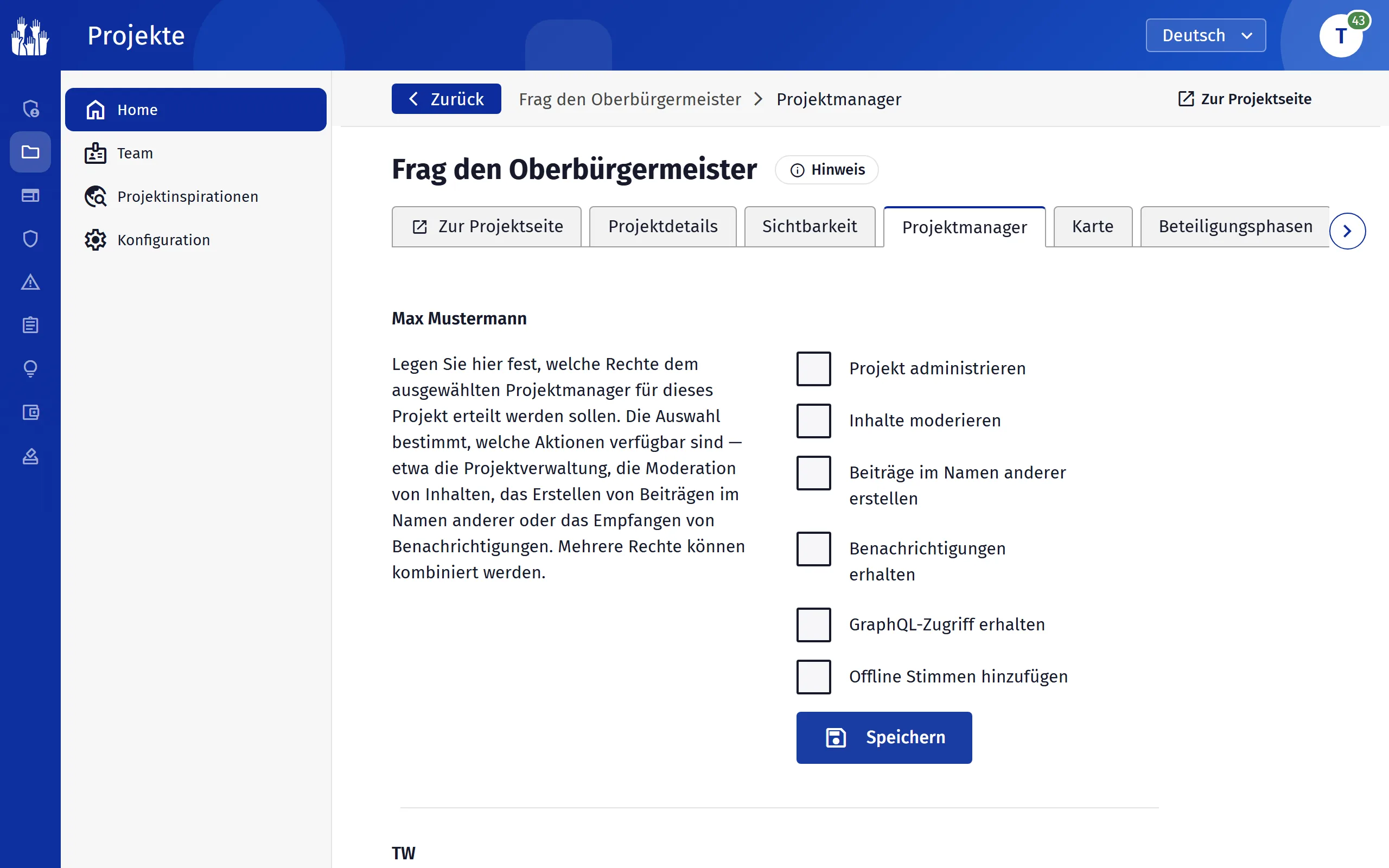
The decision: which permissions?
- “Administer project”
- For everyone who changes settings and edits the page.
- “Moderate content”
- For everyone who reviews and hides contributions and comments.
- “Create contributions on behalf of others”
- For when proposals arrive by mail or at an information stand, for example.
- “Receive notifications”
- For everyone who should get an email when new contributions arrive.
Working together
- With “Notify reviewers” on the project page, you let people know that a project is ready for review. The message goes to everyone entered for this in the project.
- You can also see who is on your team on the start page of the project area.
“Manage all” in the “Team” overview gives a person access to all projects on the platform, with all permissions. An administrator assigns this.