
Reference
Reference
Participation phases
Participation phases
A project is made up of participation phases: a proposal phase, a poll, a form, and others. Each phase has its own settings, which you set in tabs.
Participation phases
A project is made up of participation phases: a proposal phase, a poll, a form, and others. Each phase has its own settings, which you set in tabs.
Phase types
- Proposals Citizens submit ideas, support them, and comment on them. Go to the guide
- Polls Questions with answers, map questions, and question bundles, with a test mode before the start. Go to the guide
- Forms A custom form with fields, submissions, and follow-up emails. Go to the guide
- Budget Participatory budgeting in nine phases: submit, support, review, vote. Go to the guide
- Comments A comment area on a topic, with replies and ratings. Go to the guide
- Short survey Simple questions with fixed answers, with an open answer if you want. Go to the guide
- Voices Positions for and against a plan, with name, photo, and reasoning. Go to the guide
- Text editing Publish a draft text that citizens comment on passage by passage. Go to the guide
- Discussions No longer available for selection. Existing phases no longer run. Go to the guide
- Events Announce dates, with registration and a waiting list if you want. Go to the guide
- Milestones Show progress as a timeline, with progress bars. Go to the guide
- Notifications Write messages to the subscribers of the project. Go to the guide
- Livestream Show a broadcast from YouTube or Vimeo, with questions to the audience. Go to the guide
- Newsfeed Embed a news feed from rss.app. Go to the guide
- Places of interest Citizens mark places on a map, by category. Go to the guide
- Iframe Embed another web page in the project page. Go to the guide
- Mitmachbox Run a survey on devices on site, and online too if you want. Go to the guide
The phase overview
In the project menu, open “Participation phases”. There you see all phases of the project.
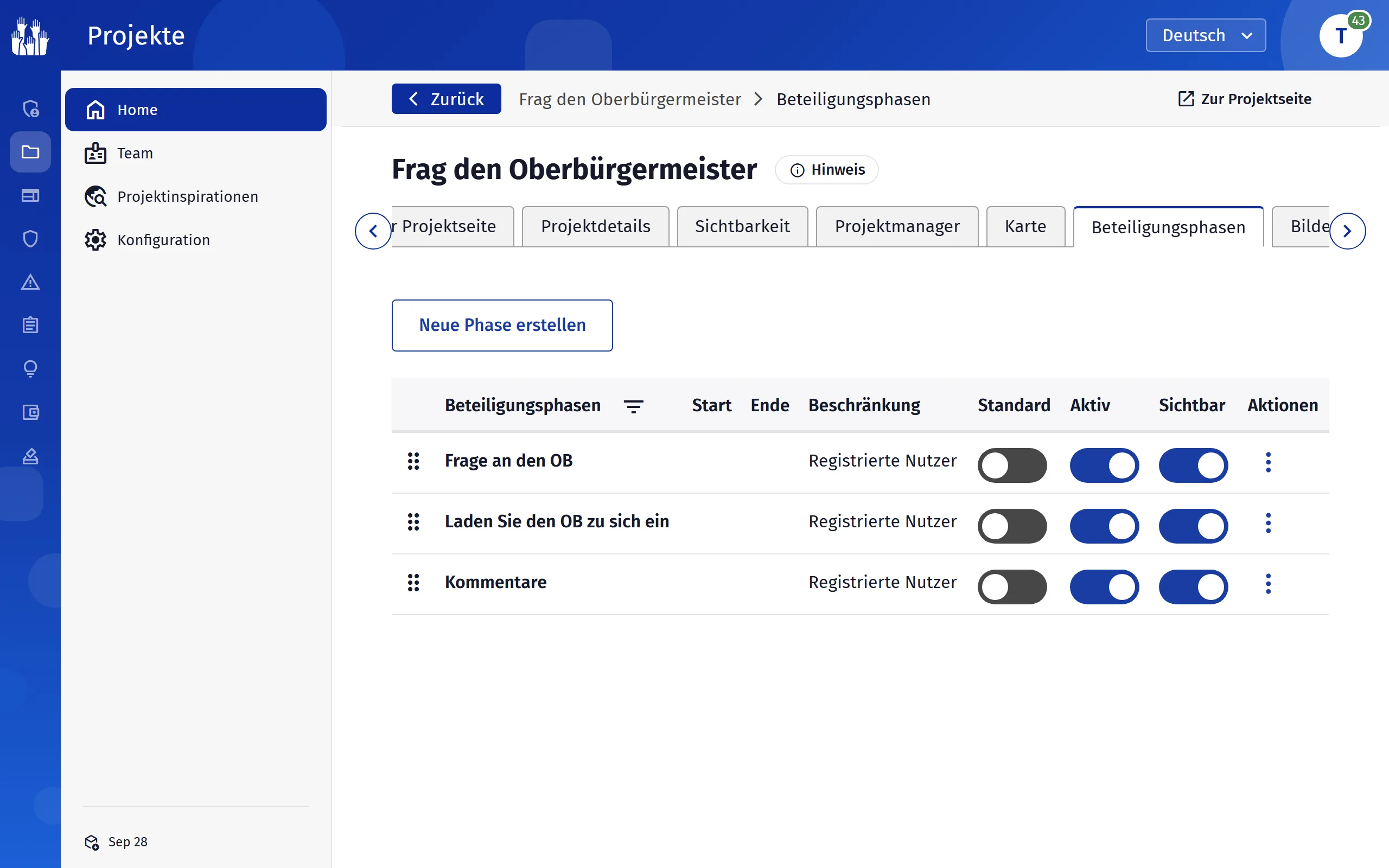
- “Default”
- This phase opens first for new visitors.
- “Active”
- Enables the phase.
- “Visible”
- Shows the phase in the project’s bar.
- Handle on the left
- Changes the order of the phases.
- Three dots
- Open the settings of the phase.
The tabs of a phase
Which tabs a phase has depends on its type. For a proposal phase, these are the tabs:
- “Duration”
- When people can take part.
- “Naming”
- Texts of the phase, such as button labels or placeholders in the form.
- “Participation restriction”
- Who can take part: guests without registration, registered or verified users, and if you want, by area or age.
- “Features”
- For example, administrator approval. When it is on, new proposals appear only after you approve them.
- “Form author”
- What people can enter when they submit: cover image, location on the map, documents.
- “User functions”
- What people can do with contributions: support, comment, share, follow.
- “Proposals”, “Comments”
- See submitted contributions and comments and moderate them.
- “Labels”, “Sentiments”
- Assign contributions to topics and to moods such as positive, neutral, or critical.
- “Map”
- Map section of the phase.
- “Polling officers”
- Who may record support on site.
- “System emails”
- The messages the phase sends.
- “AI voice assistant”, “AI flow assistant”
- See below.
- “WhatsApp”
- Only if WhatsApp is set up on your platform.
AI assistants
- Voice assistant Helps citizens write a proposal by voice.
- Text assistant Creates a draft from a short idea and checks it against criteria that you set.
Both assistants are available if AI is set up on your platform.