
Guides
Guide
Project manager
Project manager
You want to limit participation in a phase to certain people, such as verified users, an area, or an age group.
Decide who can take part
Your goal
You want to limit participation in a phase to certain people, such as verified users, an area, or an age group.
Open project area
What you need
- The phase has been created.
- You have the “Administer project” permission in the project.
How to do it
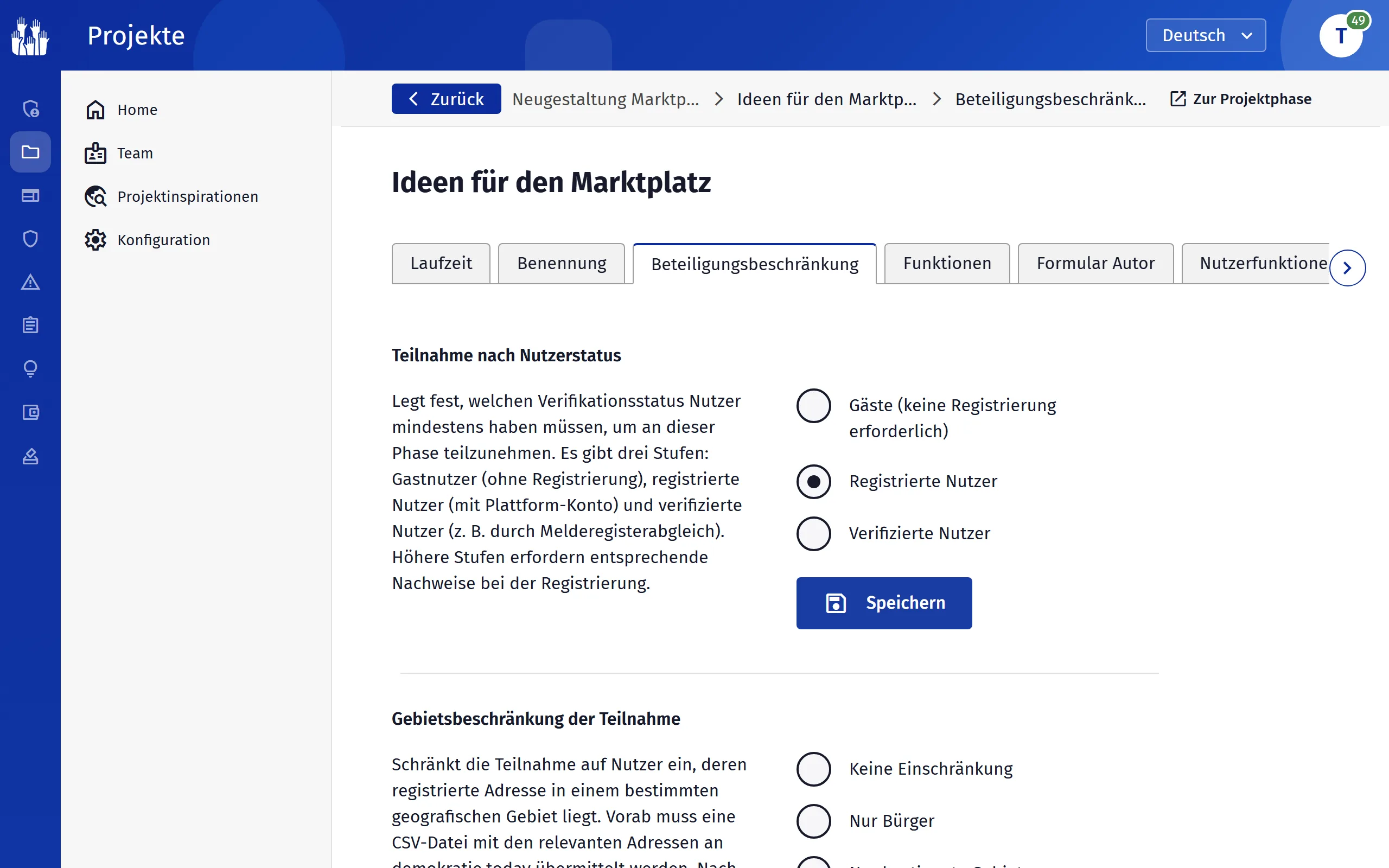
- In the project, open “Participation phases”. For the phase, open the tab “Participation restriction” from the actions.
- Under “Participation by user status”, choose “Guests (no registration required)”, “Registered users”, or “Verified users”. Click “Save”.
- If needed, narrow it down under “Area restriction for participation”: “Citizens only”, “Specific areas only”, or “Specific streets only”.
- If needed, choose an “Age restriction for participation”, an “Extended area restriction”, or a “Restriction to strong groups”.
- Each section has its own “Save” button. Click it after every change.
Your choices
- With or without an account?
- “Guests” can take part without registering. You can’t restrict by area, age, or group then, because that requires an account.
- Is an account enough, or is a check needed?
- “Verified users” admits only people with a verified account. An administrator sets how users are verified under Registration and verification.
- Only people from the municipality?
- “Citizens only” admits people whose address is in an area of your platform. “Specific areas only” lets you pick individual areas with checkboxes. “Specific streets only” lets you pick individual streets using “Search street…”.
- Only one age group?
- “Age restriction for participation” offers the age groups that an administrator has created under “Age groups”.
- Only a committee or a group?
- “Restriction to strong groups” appears when there are visible user groups. Anyone who belongs to one of the selected groups can take part.
What participants see
- If an account is missing details such as an address or date of birth, the platform asks the user to add them.
- If someone doesn’t qualify, the platform names the restriction, for example “Die Beteiligung ist auf Bürger*innen aus folgenden Gebieten beschränkt” (participation is restricted to citizens from the following areas).
- The restriction applies to taking part, not to viewing the phase.
Pitfalls
No restriction applies to administrators and project managers with “Administer project”. So test with an ordinary account.
Areas, streets, and address groups come from your platform’s address data. If none are stored, there is nothing to select.
The “Restriction” column in the list of phases does not show all restrictions, for example no streets and no groups. If in doubt, check the tab.
Who can see the project at all is set separately, under Decide where the project appears.