
Reference
Reference
Administration
Administration
In the administration, you set up the platform as a whole. You design the homepage and navigation, manage user accounts and administrators, and send newsletters.
Administration
In the administration, you set up the platform as a whole. You design the homepage and navigation, manage user accounts and administrators, and send newsletters.
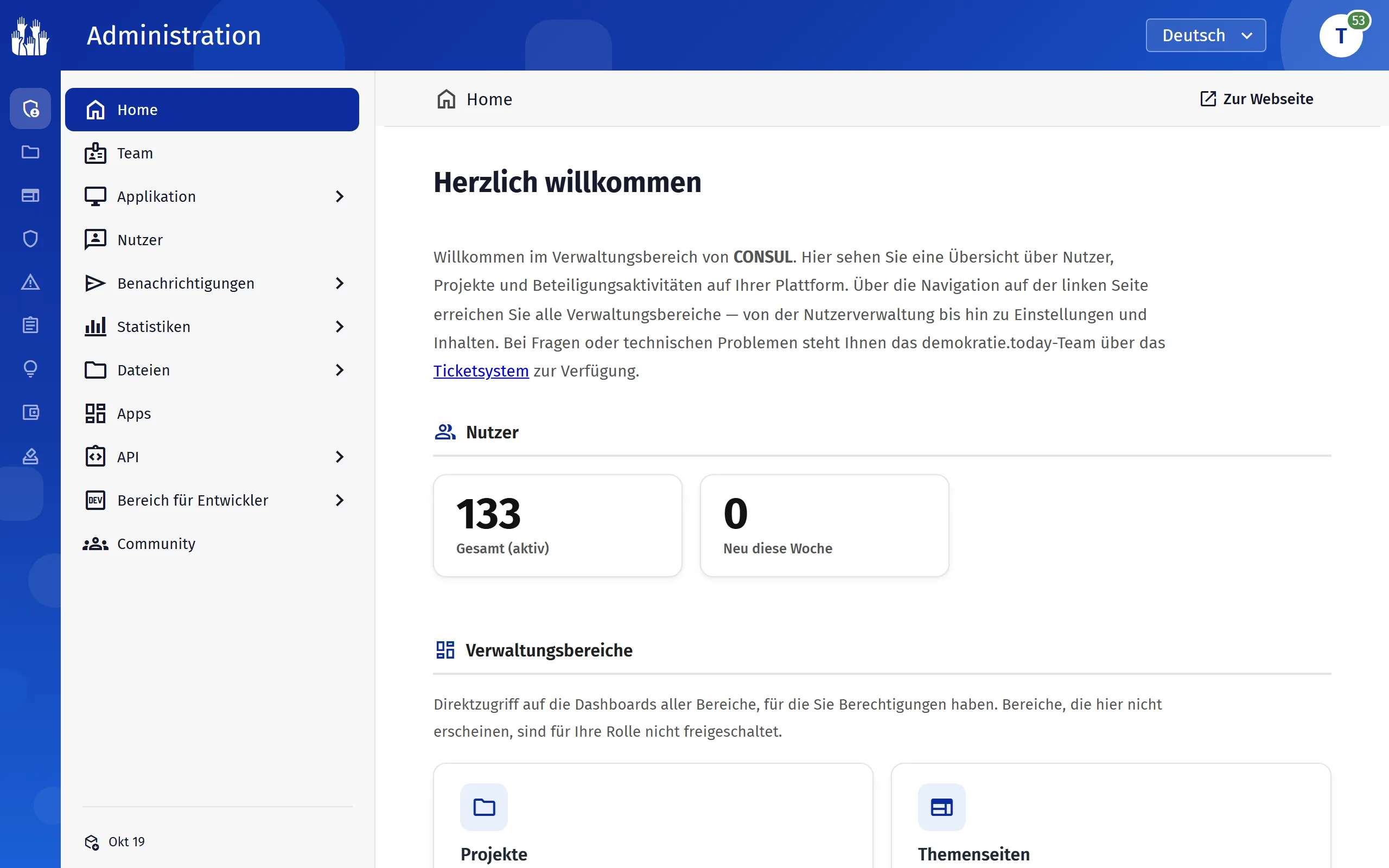
Who has access?
- Only administrators can open this area.
- Administrators also have access to the other administration areas, such as projects, moderation or topic pages.
The menu items
- Home Shows the active users and this week’s new registrations. Under “Administration sections”, tiles lead to all areas you have access to.
- Team Add administrators, invite them, or remove their rights again. Team and users
- Application Basic settings for the platform, from homepage and main menu to user groups, legal notice and privacy. The submenu items are listed below.
- Nutzer (users) All user accounts with filters and CSV export. You edit, verify or fully delete users.
- Benachrichtigungen (notifications) Send “Newsletter” to recipient groups, customize “System-E-Mails” (system emails) and show visitors time-limited notices with “Modal notifications”. Notifications and newsletters
- Statistiken (statistics) “Consul” shows key figures on users, projects, participation phases and deficiency reports. “Matomo” appears only if Matomo is enabled on your platform. Statistics
- Dateien (files) Under “Admin images”, “Admin documents” and “Resource documents”, you review, rename and delete uploaded files. “File settings” defines what users may upload. Files
- Apps Overview of the add-on modules. For apps that are not active, you send an email request to demokratie.today using “Request”. Apps and API
- API “API Clients” for external applications, “API request logs” and the “API changelog”, which opens in a new tab.
- Bereich für Entwickler (developer area) “AI settings”, “API Key” for external services, “WhatsApp” and “Machine translation”. Developer area
- Community Sits at the very bottom of the menu and leads to the user manual. The entry appears only while the address of the user manual is set.
The submenu items of “Application”
- “Homepage”, “Navigation”, “Overview pages”, “Categories”
- What visitors see first. Homepage, navigation and overview pages
- “Metadata”, “Account & access”, “Default map”, “System user”, “Features”
- Settings for the whole platform. Basic platform settings
- “Addresses”, “Age groups”, “User groups”
- The basis for restrictions by place of residence, age and group. User groups, age groups and addresses
- “GDPR”, “System pages”
- Privacy defaults, legal notice and the other footer pages. System pages and privacy
Good to know
- On larger screens, you switch between the administration areas using the narrow bar on the far left. Only the areas you have rights for appear there.
- The homepage also has a “Community” tile (only if the address of the user manual is set), plus links to the ticket system, the monthly Consul meetup and the demokratie.today newsletter.