
An idea in detail
Click the title of an idea in the list on “Home” to open its detail view. It has three tabs: “View”, “Administer”, and “Change log”.
The list on “Home”
- “Visibility”
- Switch for approval. The approval date is shown below it. Review and publish a new idea
- “Statuses”
- “Pending” before approval, then “Active”, and “Archived” once the time scope has passed.
- Search, sort, filter
- Search in “Title”, sort with “Sort by ID” and “Creation date”, and filter by “Category” and “Officer”.
- “Download CSV”, “Download GeoJSON”
- Exports the current view, including filters. The CSV file also contains the area, case officer, and “Official response”.
- Actions
- “View”, “Administer”, “Change log”, and “Delete”. Only administrators, idea administrators, and case officers with “Manage all” can delete.
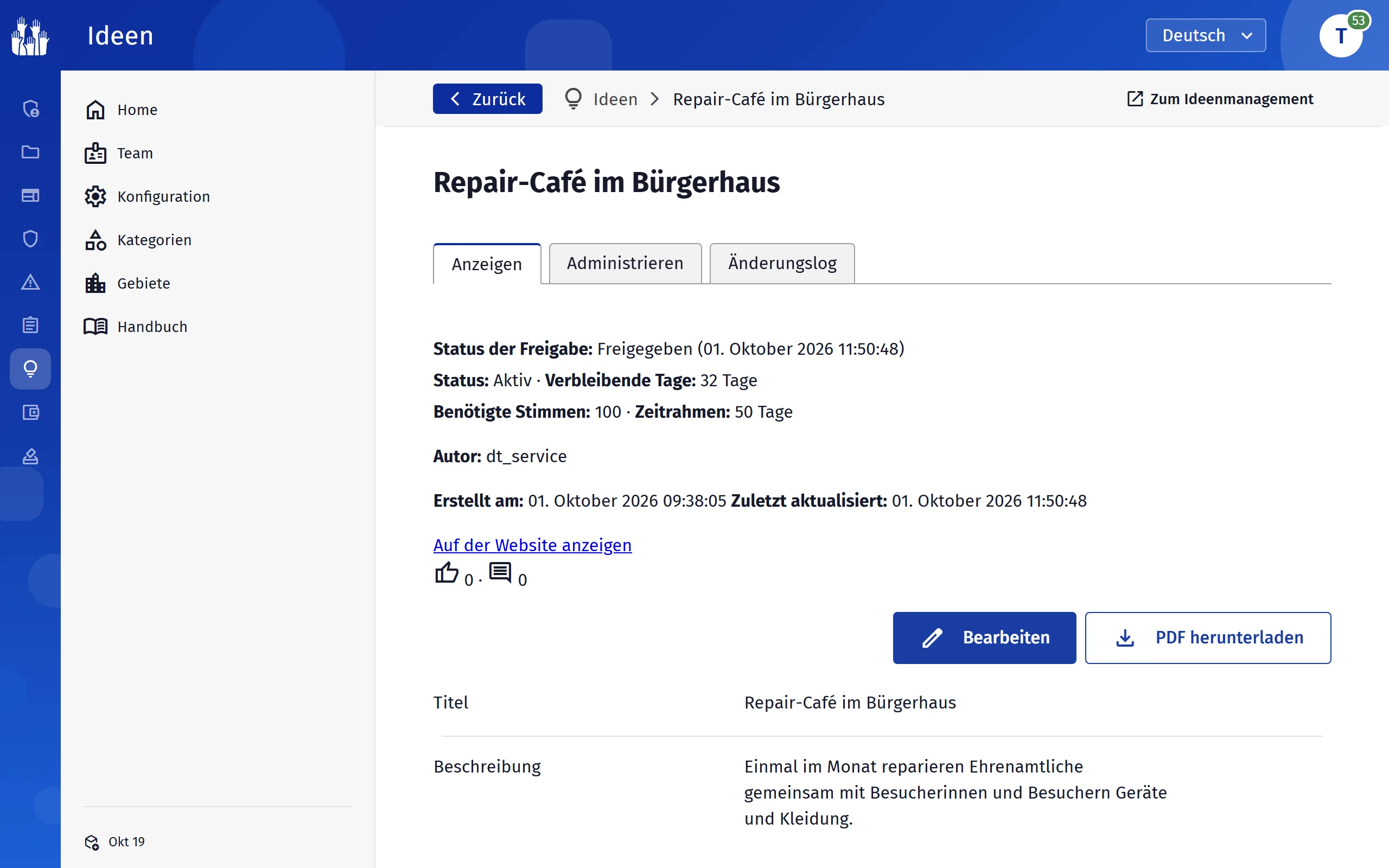
“View” tab
At the top are “Approval status”, “Statuses” with “Remaining days”, “Votes required”, “Time scope”, the author, and dates. Below that come the title, description, image, documents, video URL, “On behalf of”, category, and map.
- “Edit”
- Changes the content of the idea. Edit and answer an idea
- “Download PDF”
- The idea as a PDF. If the idea has a location, the PDF includes a map section.
- “View on the website”
- Opens the public page of the idea.
- “Official response”
- The administration’s answer, saved with “Save”.
- “Internal notes”
- For your team only. Above the notes is the reference “Zu:” (to:) with the title of the idea. Use “Send notification” to inform colleagues by email.
The official response currently does not appear on the public page of the idea, and the person who submitted the idea does not receive an email about it. It appears in the detail view, in the CSV export, and in the platform’s API.
“Administer” tab
- “Votes required”
- Once the idea reaches this number of supports, it has reached its quorum. Default: 100.
- “Timeframe (days)”
- How long the idea stays “Active” after approval. Default: 50 days.
- “Officer”
- Who is responsible. The newly assigned person gets an email. Assign ideas
Each field has its own “Save” button. Both numbers accept only values of 1 or higher.
“Change log” tab
The table shows every change to the idea with “Field”, “Old value”, “New value”, “Edited on”, and “Edited by”. For example, you can see who approved or reassigned the idea.